
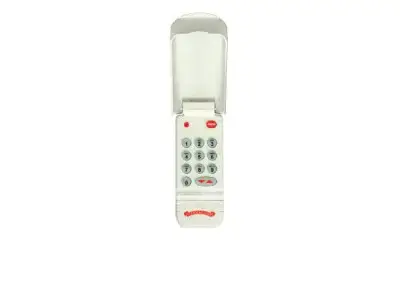
OWK-BX CodeDodger 1 Keypad with Odyssey
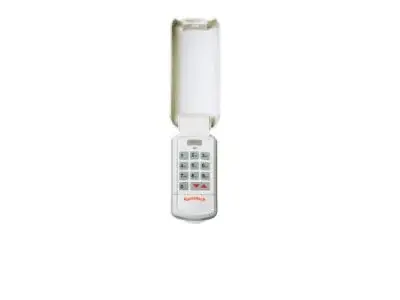
OKP-BX CodeDodger 2 Keypad with Odyssey
Create Your Wireless Keypad PIN (Personal Identification Number)
On your wireless keypad:
On the power head:
NOTE: If the door does not move, check the LED on the keypad. If the LED is blinking rapidly, the PIN was entered incorrectly. After the LED stops blinking, re-enter your PIN ad try again. Any keypad button will control the door for 30 seconds after the door starts moving. Rapid blinking of the red LED indicates an error. After a few seconds the LED will turn off. Start over.
Proceed to the Mounting Instructions.
All garage door openers will use the same PIN.
On the wireless keypad:
On your garage door opener power head:
NOTE: If the door does not move, check the LED on the keypad. If the LED is blinking rapidly, the PIN was entered incorrectly. After the LED stops blinking, re-enter your PIN ad try again. Any keypad button will control the door for 30 seconds after the door starts moving. Rapid blinking of the red LED indicates an error. After a few seconds the LED will turn off. Start over.
Proceed to the Mounting Instructions
The keypad must be mounted in sight of the door(s), at least 5 feet above the ground and clear of any moving door parts. Mounting screws are located inside the battery compartment.
A temporary PIN allows temporary access to your home by repair persons, meter readers, etc.
NOTE: Do NOT reprogram the garage door opener(s). Temporary PIN remains active only until the next time your normal PIN is entered.
Get Started Today
Request A Quote
At Overhead Door Company of The Antelope Valley™, we are dedicated to providing comprehensive solutions for your garage door needs. Specializing in the sale and installation of advanced garage door keypads, including the OWK-BX and OKP-BX models, we ensure you have secure and convenient access to your home. Our expertise extends to programming, troubleshooting, and maintenance, making us your go-to resource for all things related to garage door openers and accessories.
Serving both Los Angeles and Kern Counties, our team is committed to delivering top-notch service and support. Whether you're looking to install a new keypad, program an existing one for multiple doors, or need assistance with a forgotten PIN, Overhead Door Company of The Antelope Valley™ has the knowledge and experience to assist you efficiently. Trust us to keep your garage door system operating smoothly and securely.
The OWK-BX and OKP-BX keypads, part of the CodeDodger® system, offer advanced security and user-friendly operation for your garage door. The OWK-BX is designed for single-door operation with the Odyssey® opener, while the OKP-BX provides enhanced capabilities for managing multiple garage doors. Both models feature a durable, weather-resistant design and a backlit keypad for easy use in low-light conditions.
Key features include the ability to program a unique Personal Identification Number (PIN) of 3 to 8 characters, ensuring only authorized users can access your garage. The CodeDodger® technology encrypts the signal between the keypad and the opener, preventing unauthorized access and enhancing security. These keypads are engineered for reliable performance and seamless integration with compatible Overhead Door® opener systems.
Programming your OWK-BX or OKP-BX keypad is a straightforward process designed for user convenience. Whether you need to set up a PIN for a single garage door or configure access for multiple doors, the steps are intuitive. Follow the instructions carefully to ensure your keypad is correctly synced with your garage door opener for secure and reliable operation.
For programming a single door with the CodeDodger 2 system, you'll typically press 3, 5, 7, followed by the PROGRAM key, entering your desired PIN, and pressing PROGRAM again. For multiple doors, the process involves similar steps, ensuring each door is recognized by the system. The keypad will confirm successful programming with indicator lights, and any button press will activate the opener for a set duration, allowing you to control the door's movement.
Encountering issues with your garage door keypad, such as a forgotten PIN or a low battery, can be frustrating. However, both the OWK-BX and OKP-BX models are designed with user-friendly troubleshooting features. Resetting a forgotten PIN or replacing the batteries are common maintenance tasks that ensure your keypad continues to function effectively and securely.
If you forget your PIN, a reset procedure is available. This typically involves pressing and holding both the PROGRAM button and the UP/DOWN button simultaneously for a specific duration, which will allow you to set a new PIN without losing other programming data. For battery replacement, the process is usually simple, involving accessing the battery compartment and swapping out the old batteries for new ones, ensuring the keypad remains operational without losing its settings.