
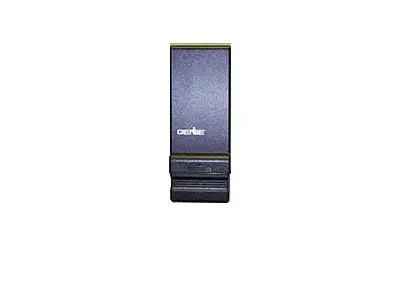
Genie Wireless (slide up cover)
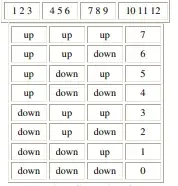
Resulting Security Code
PLEASE NOTE: DURING 2000, THE FACTORY MODIFIED THIS KEYPAD. IF THE KEYPAD DOES NOT WORK AFTER FOLLOWING THESE DIRECTIONS – TRY REPEATING THE DIRECTIONS BUT SKIP STEP #2
Battery: Access Panel is at the bottom edge of the keypad.
To Operate: Depress area and slide down. Light should come on when cover is raised
Reset Keypad:
1. Open cover on keypad just enough to press “#” & “8” at the same time. While pressing
these keys, raise the cover all the way (this erases the old code). Release the buttons.
2. Close the cover. Open cover fully.
3. Press numbers “3”, “5”, “7”, and “#”. The red light should be blinking about once a second.
4. Enter your new PIN number and press #. The red light should be blinking faster.
5. Enter the security code number and press “*”- red Light will turn off.
6. Close keypad cover fully.
6. Slide keypad cover open fully and enter the pin number and press “*” to test with your new code number.
To Change Pin # Without Resetting Keypad:
1. Open cover fully
2. Enter OLD pin number and press “#” – red light will blink slowly.
3. Enter the NEW pin number and press “#” – red light will blink faster.
4. Press “*” – red light will turn off.
5. Close keypad cover.
6. Close keypad cover fully.
6. Slide keypad cover open fully and enter pin number and press “*” to test with your new
code number.
NOTE: On a 456 Operator, press the far right button in the cut-out area to program a new
transmitter. THIS IS FOR “O-SERIES” TRANSMITTERS ONLY.
Get Started Today
Request A Quote
As a leading provider of garage door solutions in Lancaster, CA, Overhead Door Company of The Antelope Valley™ offers comprehensive services for both residential and commercial clients. We specialize in the installation, repair, and maintenance of a wide range of garage door systems, ensuring your property is secure and functional.
Our commitment to quality extends to every aspect of our work, from initial consultation to final inspection. We are dedicated to providing reliable and efficient garage door services that meet the unique needs of our community, backed by years of industry experience and a commitment to customer satisfaction.
This guide provides step-by-step instructions for operating and resetting your Genie Wireless slide-up cover keypad. Understanding these functions will help you efficiently manage access to your garage and ensure the security of your property.
The Genie Wireless slide-up cover keypad is designed for user-friendly operation. To reset the keypad, a specific sequence of button presses is required, involving both the cover and numerical inputs. This process is crucial for maintaining security and for troubleshooting any access issues you might encounter.
To reset your Genie Wireless slide-up cover keypad, begin by opening the cover just enough to access the buttons. Simultaneously press and hold the '#' and '8' buttons. This action initiates the reset sequence, preparing the keypad for new programming.
Following the initial step, enter the sequence '3', '5', '7', and then '#' on the keypad. After this, fully close the keypad cover. You will then be prompted to enter your old PIN followed by '#', indicated by a slow blinking red light. Finally, enter your new PIN followed by '#', which will be confirmed by a faster blinking red light, signifying a successful reset.
If you encounter issues with your Genie Wireless slide-up cover keypad, such as unresponsiveness or incorrect code entries, several troubleshooting steps can be taken. Ensuring the keypad is properly powered and that the battery is functional is a primary concern.
Common problems can often be resolved by performing a full reset of the keypad, as detailed in our reset guide. Additionally, checking for any physical obstructions or damage to the keypad or its cover can help identify the root cause of the malfunction. If issues persist, contacting our expert technicians at Overhead Door Company of The Antelope Valley™ is recommended.